
Think of a small business virtual receptionist as your company's digital front desk, powered by smart AI. It's a service that answers your phone calls and website chats automatically, around the clock. This isn't just an answering machine; it actively helps customers by answering their questions, gathering their info, and even scheduling appointments right into your calendar. The best part? It lets you get back to running your business without being a slave to the phone.
Stop Missing Calls and Losing Customers

We've all been there. You're deep in concentration on a critical project, or maybe you're face-to-face with your most important client. Your phone rings, but you can't possibly pick it up. By the time you get a free moment to call back, it's too late. That potential customer already called your competitor—the one who answered right away.
That isn't just one missed call. It's a lost sale, and it chips away at your reputation. For a small business, every single lead is gold. When you can't respond instantly, it tells a potential customer you might not be reliable, and that's a tough first impression to shake. In fact, being unresponsive is one of the biggest frustrations customers have with small companies.
The True Cost of a Single Missed Call
A missed call's impact goes far beyond that one lost opportunity. It sends ripples through your business. You don't just lose the initial sale; you lose all the future business that person might have brought you, not to mention the powerful word-of-mouth referrals they could have provided. Today's customers move fast and expect immediate answers. If you can't give them that, they'll find someone who can in a heartbeat.
This constant pressure to be "on" leads to serious stress and burnout for business owners trying to do it all. Answering the phone while trying to run the actual business is a recipe for getting nothing done well. This is where a modern solution really makes a difference.
An AI-powered virtual receptionist does more than just take messages. It's an automated system designed to engage, qualify, and convert callers into customers, ensuring no opportunity ever slips through the cracks.
A small business virtual receptionist is built to solve this exact problem. It's an intelligent, 24/7 first point of contact that makes sure every call and chat gets a professional, immediate response. This technology becomes your front-line defense, letting you run your business without being chained to your phone.
How a Virtual Receptionist Creates Growth
By handling those initial communications, a virtual receptionist completely changes how you connect with potential and existing clients. It creates a smooth, professional experience that builds trust from the very first "hello." To see how this works in the real world, you can learn more about the story behind our AI Virtual Receptionist.
This technology gives your business the power to:
- Capture Every Lead: Whether a call comes in at 2 AM on a Sunday or right in the middle of a team meeting, the AI is always there to engage the caller and get their details.
- Improve Customer Experience: People love instant, helpful answers. It makes them feel heard and valued, leaving a great lasting impression of your company.
- Boost Your Productivity: The system filters out spam calls and handles all the routine questions, freeing you and your team to focus on the work that actually grows your business.
At the end of the day, bringing on a virtual receptionist isn't just a small tweak. It's a strategic decision to protect your revenue, sharpen your professional image, and build a stronger, more scalable business.
How an AI Virtual Receptionist Actually Works
Think of it this way: a traditional answering service is like a flip phone. It’s reliable for one basic thing—taking a message and passing it along. An AI-powered virtual receptionist, on the other hand, is like the latest smartphone. It doesn’t just take messages; it interacts intelligently, syncs up with your other tools, and handles complex tasks all on its own.
This is a whole lot more than a fancy voicemail. We're talking about a smart system built to understand what your callers need and act on it, 24/7. Let’s pull back the curtain and see what makes it all tick.
The Brains Behind the Voice
The real magic starts with something called Natural Language Processing (NLP). This is the technology that lets the AI understand what people are actually saying, not just the words they use. So when a customer calls and says, "Hey, I need to move my appointment to Friday afternoon," NLP is what helps the AI figure out the real request: reschedule an existing event.
Right alongside NLP is machine learning (ML). You can think of ML as the system’s ability to get smarter over time. With every call it fields, the AI gets better at understanding different accents, casual slang, and all the unique ways customers ask for things. It learns to tell the difference between a hot sales lead and a simple support question, constantly sharpening its responses.
This combo is what allows the AI to ditch the robotic, one-word-answer scripts and have a real conversation. It makes your customers feel like they're actually being heard.
Custom Rules and Getting Calls to the Right Place
An AI virtual receptionist doesn’t just pick up the phone; it acts as your frontline operator, directing calls exactly where they need to go based on rules you set. This process, often called call triage, is where you get to customize the AI to work just like an employee would. You’re essentially creating a playbook for how to handle every type of call.
For example, you could set up rules like:
- Hot Sales Leads: If a caller mentions words like "quote," "pricing," or "new project," the AI knows to transfer that call directly to your cell phone. No delays.
- Support Questions: If someone says they have a "tech issue" or "billing question," the AI can check your support team's calendar and book a callback time that works for everyone.
- Booking Appointments: For anyone asking to "book a consultation," the AI can look at your live calendar availability and get them on the schedule right then and there.
This kind of smart routing means your most important calls get to you instantly, while the routine stuff is handled automatically. You get to stay focused on what really matters.
By automatically sorting and handling calls from the get-go, a virtual receptionist makes sure every caller gets what they need without you having to lift a finger. It’s a huge boost for both your efficiency and their experience.
Plugging Into the Tools You Already Use
What really makes a modern virtual receptionist so powerful is its ability to connect with the software you rely on every day. This is what turns it from a simple answering machine into a core part of your business operations. It acts as a central hub, passing information between your phone lines and your other systems.
Two of the most critical integrations are:
- Calendar Integration: By connecting to your Google Calendar, Outlook, or another scheduler, the AI can see your availability in real-time. It can book, move, or cancel appointments directly, then automatically send confirmations to you and the customer.
- CRM Integration: When a new lead calls in, the AI can create a new contact in your CRM, whether you use HubSpot, Salesforce, or something else. It logs their name, number, and why they called, giving your sales team a perfectly clean record to follow up on.
This seamless connection gets rid of mind-numbing data entry, cuts down on human error, and builds a powerful, self-running system for managing all your customer conversations. It's no surprise that the AI receptionist market hit USD 3.85 billion in 2024 and is expected to reach USD 9 billion by 2033. That’s a 134% jump, driven by small businesses demanding smarter, more affordable solutions. You can dive deeper into these trends and what they mean for businesses like yours at resonateapp.com.
The Real-World Payoff for Your Business
Okay, let's get past the tech talk. What does a small business virtual receptionist actually do for you? When you get down to it, the value isn't just about answering calls—it's about how it directly impacts your bottom line, keeps customers happy, and makes your daily operations run smoother.
This flowchart gives you a quick visual of how a smart virtual receptionist thinks. It’s not just a fancy answering machine; it's a decision-making system designed to get every caller exactly what they need, right away.
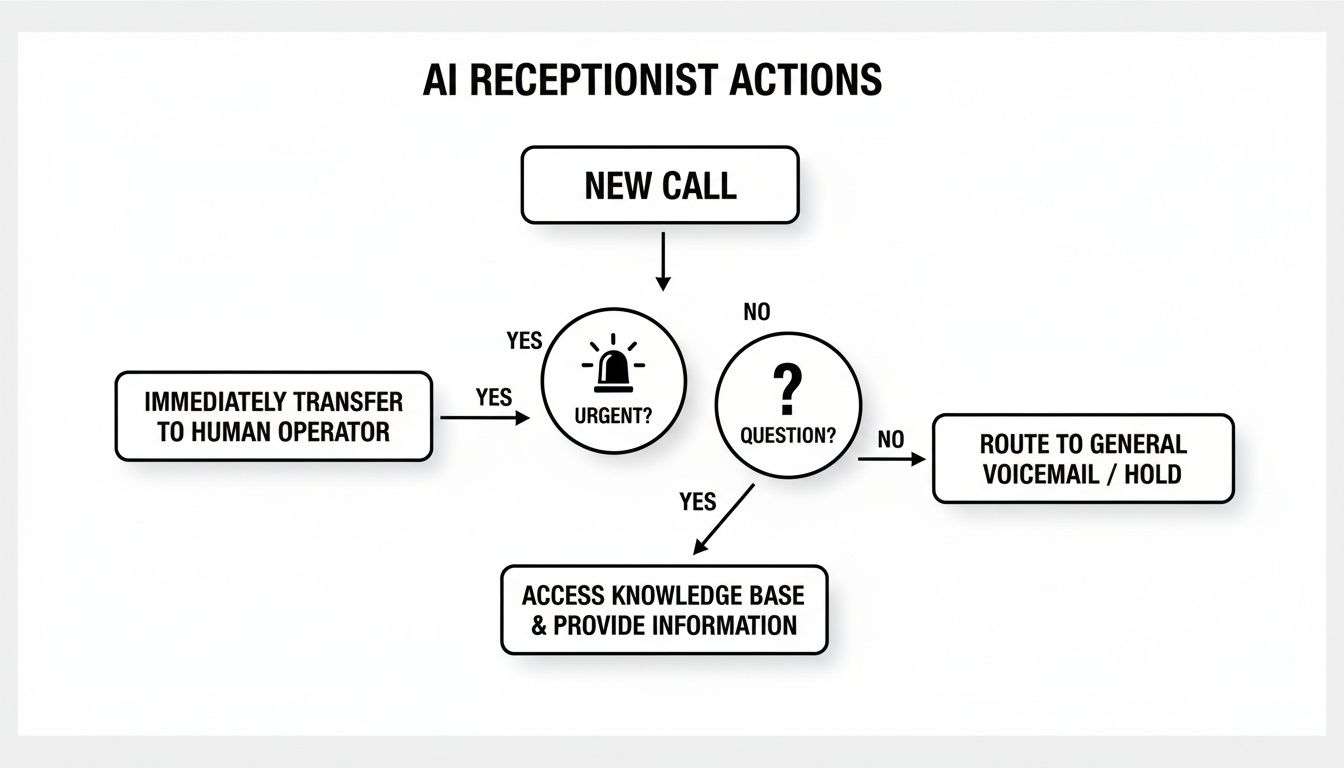
As you can see, the system instantly sorts calls. Whether a customer needs to book an appointment or an urgent issue needs a human touch, it makes sure every call is handled efficiently and correctly. No more delays, no more dropped balls.
Slash Your Operational Costs
This is the benefit you'll feel almost immediately: a huge drop in overhead. When you hire an in-house receptionist, the costs go way beyond their salary. You're also paying for benefits, payroll taxes, sick days, and vacation time, not to mention the desk, computer, and phone they need. All of that can easily pile up into thousands of dollars a month.
A virtual receptionist flips that model on its head. You get top-tier call handling for a predictable, flat monthly fee. This frees up a serious amount of cash you can pump back into the parts of your business that actually generate growth, like a new marketing campaign or developing a new service.
Capture More Leads Around the Clock
Your business might close at 5 PM, but your potential customers don't stop searching. Think about it—people are often looking for services late at night or on weekends. If they call your office at 10 PM and get your voicemail, what's their next move? They’ll just call your competitor in the morning.
A virtual receptionist essentially keeps your doors always open. This 24/7 availability means you’re catching leads that would have otherwise slipped away, turning those late-night questions into booked appointments and fresh revenue.
This kind of always-on service is fast becoming what customers expect. It's no surprise the virtual receptionist market is projected to hit USD 10.85 billion by 2035. Small businesses are driving this trend, using these tools to cut down on missed opportunities by as much as 47%. You can dig into more of these market insights at businessresearchinsights.com.
Elevate Your Customer Experience
You only get one chance to make a first impression. When a customer calls, an instant, professional, and genuinely helpful response builds trust right from the start. A virtual receptionist delivers that same great experience every single time, without the off-days or distractions that are just part of being human.
The system ensures every caller feels like they've been heard. It can answer their basic questions, give directions to your office, or book them a slot on the calendar—all without ever putting them on hold. That level of consistent, excellent service is what turns a one-time customer into someone who raves about your business to their friends.
Boost Your Team's Productivity
Let's be honest: the constantly ringing phone is a productivity killer. Every time you or your team has to stop a critical task to answer a call—especially when it's just a robocaller or someone asking for your hours again—it shatters your focus.
Think of your virtual receptionist as the ultimate gatekeeper. It screens out the spam and handles all the routine questions on its own. This frees up your team to focus on what they do best, whether that's closing a big deal, finishing a client project, or providing high-touch customer support. When you remove those constant interruptions, you give your team the space they need to be truly effective.
Scale Your Operations Effortlessly
So, what happens when that new marketing campaign you launched is a massive success and your phone starts ringing off the hook? For a small team, a sudden spike in calls can be a nightmare, leading to missed calls and frustrated potential customers.
An AI virtual receptionist is built for exactly this scenario. It can handle dozens or even hundreds of calls at the same time without missing a beat, making sure every single person who calls gets a professional response. This built-in ability to scale means your business can grow without you having to worry if your front desk can keep up. You can run that big promotion with confidence, knowing you're ready to capture every single opportunity it brings in.
What to Look For: The Non-Negotiable Features of a Great Virtual Receptionist
Picking the right virtual receptionist service can feel overwhelming. You're bombarded with technical terms and slick promises, and it's tough to know what actually matters for a small business. Think of this as your buyer's guide—a straightforward checklist of the features that separate a glorified answering machine from a tool that will genuinely grow your business.
Let's be clear: not all services are built the same. A top-tier small business virtual receptionist needs to be a true extension of your team, not just a passive message-taker. The right features will save you time, capture more leads, and give every single person who contacts you a polished, professional experience.
Here’s exactly what you should be looking for.
24/7 Omni-Channel Support
Your customers aren't just calling between nine and five, and they're not always picking up the phone. A virtual receptionist that truly works for you has to be on the clock 24/7 and available everywhere your customers are.
This means it must handle:
- Phone Calls: It has to answer every single call, day or night, without fail. This way, you never miss a lead, even if they call on a holiday or in the middle of the night.
- Website Chats: A lot of people prefer to type instead of talk. An integrated web chat lets your AI receptionist engage visitors on your website in real-time, answering their questions and grabbing leads right then and there.
Being constantly available across multiple channels isn't a luxury anymore—it's what modern customers expect. It also gives you a huge leg up on competitors who are still stuck in the 9-to-5 mindset.
Intelligent Call Routing and Lead Qualification
A great virtual receptionist doesn't just answer—it understands. It needs to be smart enough to act as your frontline gatekeeper, filtering out spam while instantly directing important calls to the right person. This is done with smart call routing and custom scripts designed to qualify leads.
For instance, you could set it up so that a caller who mentions "new project" or "pricing" is immediately transferred to your sales team's cell phones. But if someone asks about a "billing issue," the AI can schedule a callback with your support staff instead. This is how you make sure high-value calls get top priority and your team's time is spent on conversations that actually move the needle.
This kind of smart automation is why the virtual receptionist software market is set to skyrocket from USD 1.2 billion in 2026 to USD 3.5 billion by 2033, fueled by an incredible 16.9% annual growth rate. Businesses are hungry for tools that can automatically screen and qualify their incoming communications. You can learn more about this booming software market on openpr.com.
Seamless Integrations with Your Core Tools
To get the most out of your virtual receptionist, it has to play nicely with the other software you use to run your business. A standalone system just creates more work and disconnected information. Look for one that integrates smoothly with your calendar and your Customer Relationship Management (CRM) platform.
When your virtual receptionist talks to your other software, it transforms from a simple communication tool into the central nervous system of your customer operations. Every interaction is logged, and every action is automated, eliminating human error.
Here's why this is so critical:
- Calendar Integration: The AI can see your real-time availability and book appointments directly into your schedule. It even sends out automated confirmations to you and the client, so everyone is on the same page.
- CRM Integration: When a potential new customer calls, the system can automatically create a new contact in your CRM, log the call details, and even assign a follow-up task to your sales team.
This level of integration saves countless hours of tedious admin work and ensures no lead ever falls through the cracks. As you explore different AI receptionist solutions, make sure you find one that plugs right into your existing workflow.
Detailed Analytics and Reporting
You can't improve what you don't measure. A quality virtual receptionist service should give you a dashboard with clear, detailed analytics on its performance. This data offers a window into your communication patterns and helps you make much smarter business decisions.
Look for a service that tracks key metrics like:
- Call Volume: See when you get the most calls so you can identify your peak business hours.
- Appointment Booking Rate: Find out how effectively the AI is turning inquiries into scheduled meetings.
- Lead Capture Data: Understand where your best leads are coming from—whether it's the phone or your website chat.
These reports don't just prove the service is paying for itself; they show you where you can tweak your scripts and call flows to get even better results.
Getting Your Virtual Receptionist Set Up in Five Steps
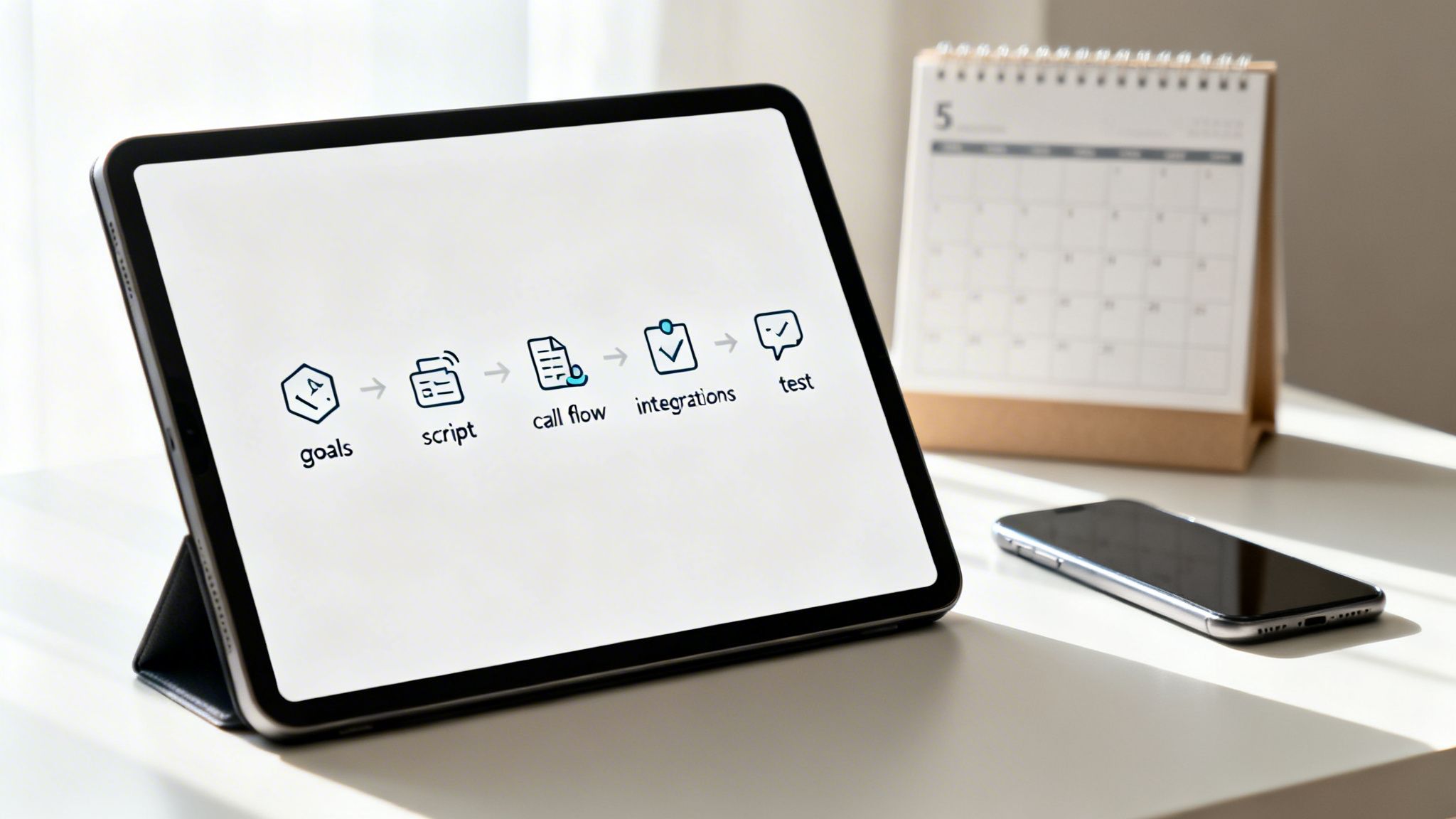
Putting a small business virtual receptionist to work might sound like a massive technical undertaking, but it’s not. Today’s platforms are built for business owners, not IT wizards. The whole setup process is really about one thing: teaching the AI how you want your business to sound and act.
Let's walk through this simple, five-step roadmap to get you up and running in no time.
Step 1: Figure Out Your "Why"
Before you touch any settings, take a step back and ask what you really need this for. Is your main goal to stop missing after-hours sales leads? Or are you just tired of your team answering the same five questions a dozen times a day? Knowing your primary objective from the start will guide every other decision.
Most small businesses are trying to accomplish one of these things:
- Capture Every Single Lead: Make sure no call or website chat slips through the cracks, especially after you've all gone home.
- Automate Appointment Booking: Let customers book, change, or cancel appointments right on your calendar without playing phone tag.
- Handle the Easy Questions: Free up your staff by letting the AI answer common questions about hours, location, or services.
Getting this clear first means you'll build a system that actually solves a real problem for you.
Step 2: Script Your Key Conversations
Now for the fun part: teaching the AI how to talk like a human—specifically, a human from your company. This is your chance to bake your brand’s personality right into its responses. You don’t need to plan for every wild question, but you absolutely should script the most common interactions. This guarantees every customer gets a consistent, professional experience.
Start with the core interactions:
- The Greeting: How does the first "hello" sound? A simple, "Thanks for calling [Your Company Name], how can I help you today?" is a great starting point.
- Lead Qualification: What does the AI need to ask to spot a hot lead? Something like, "Are you a current customer, or are you looking for a quote on a new project?" can work wonders.
- Booking an Appointment: What info is essential? You'll likely need the caller's name, phone number, email, and what service they're interested in.
Step 3: Map Out Your Call Flows
A call flow is just a fancy term for a decision map. It tells the AI what to do based on what the caller says. Think of it as creating a flowchart that guides every caller to the right person or the right answer, making sure nothing gets lost in the shuffle.
Here's a simple call flow in action:
- A call comes in: The AI answers with your custom greeting.
- The AI asks: "Are you calling about a new project or an existing one?"
- If the caller says "New Project": The AI immediately forwards the call to the sales team's cell phone.
- If the caller says "Existing Project": The AI asks for their name and offers to book a callback with the support team.
This kind of smart routing ensures urgent calls get handled immediately while routine stuff is managed automatically.
Step 4: Connect It to Your Other Tools
For your virtual receptionist to be truly helpful, it needs to talk to the software you already use every day. Connecting it with your calendar (like Google Calendar or Calendly) and your CRM is a must. This simple step stops you from having to manually copy-paste information and makes sure everyone on your team has the latest customer details.
When your systems are synced, your virtual receptionist becomes the central hub for all your front-line communications.
Step 5: Give It a Test Drive
Alright, it's time for a dry run. Before you flip the switch and go live, call your own number. Pretend you're a customer. Does the script sound natural? Does the call get routed correctly? Does the test appointment show up on your calendar?
This final check is your chance to smooth out any rough edges. It allows you to launch your new small business virtual receptionist feeling confident that it's ready to deliver a perfect experience from the very first call.
Measuring Success and Calculating Your ROI
So, you’ve brought on a small business virtual receptionist. It feels like the right call, but how do you know it's actually making a difference? Beyond just feeling more organized, you need to see how it's impacting your bottom line. The good news is, you don't need a degree in data science to figure it out.
It’s all about tracking a few key numbers—think of them as the vital signs for your customer communications. This will show you, clear as day, whether your investment is truly paying off.
Key Metrics to Monitor
The best virtual receptionist platforms give you a dashboard with analytics, so you won't have to dig for this information. It should all be right there at your fingertips.
Here’s what you should be keeping a close eye on:
- Number of Qualified Leads Captured: This is the big one. How many genuine, ready-to-talk prospects did your AI actually catch from calls and chats? This number is your direct line to new business.
- Appointment Booking Rate: Of all the people who should have booked a meeting, how many actually did? A high conversion rate here means your virtual receptionist is doing its job and pushing people to the next step.
- Reduction in Missed Calls: Pull up your old phone logs and compare them to your new ones. You should see a huge drop in unanswered calls. Every call that's now being answered is a potential sale you were previously losing.
- Peak Call Times: When does your phone blow up? Knowing your busiest hours helps you understand when customers are most active and lets you schedule your team more effectively for those moments that still need a human touch.
Calculating Your Return on Investment
Seeing the numbers is great, but translating them into a return on investment (ROI) is what really makes the case. The math here is surprisingly simple but incredibly powerful.
ROI isn't just a business buzzword. It's the proof that your virtual receptionist isn't just another monthly expense—it's a tool that actively makes you money.
Here's a simple way to break it down:
- Calculate Total Value Gained: Add up the revenue from all the new leads your AI captured. Then, figure out how much you saved by not having your staff handle those routine calls and add that in, too.
- Subtract the Monthly Cost: Take that total value and subtract what you pay for the service each month.
- Get Your ROI Percentage: Divide the net profit by the monthly cost, then multiply by 100 to get your percentage.
Let's walk through a quick example for a local plumbing company:
| Metric | Monthly Value |
|---|---|
| New Jobs Booked (5 jobs @ $500) | $2,500 |
| Admin Time Saved (10 hrs @ $25/hr) | $250 |
| Total Value Gained | $2,750 |
| Virtual Receptionist Cost | -$200 |
| Net Profit | $2,550 |
| ROI Percentage | 1,275% |
As you can see, the value is undeniable. The service pays for itself many, many times over.
Looking at the hard data takes the guesswork out of the equation. For more tips and strategies, check out our other small business resources.
Frequently Asked Questions
It's smart to ask questions before bringing any new tool into your business. Even when the benefits are clear, you want to be sure it's the right fit. Let's walk through some of the most common things business owners ask when they're thinking about a virtual receptionist.
We'll cover the practical, day-to-day stuff so you get a full picture of what to expect.
How Is This Different From a Standard Answering Service?
Think of it this way: a traditional answering service is like a human notepad. They take a message and pass it on. That’s it. But a small business virtual receptionist powered by AI is more like a highly-trained assistant who actually does things.
For example, it can:
- Answer common questions instantly using the information you provide.
- Ask the right questions to see if a caller is a serious lead.
- Book appointments right into your calendar.
- Know when a call is urgent and route it to the right person, right away.
The bottom line is that it actively helps move the conversation forward, instead of just putting it on pause for you to deal with later.
Will the AI Voice Sound Robotic and Unprofessional?
That's a fair question, and probably the number one concern we hear. We all remember those clunky, robotic voices from old automated systems. Thankfully, the technology has leaped forward. Today’s AI uses advanced voice synthesis that sounds remarkably natural, warm, and professional.
You also get a lot of control. Most platforms let you choose from different voices and completely customize your scripts and greetings. This means the first impression your callers get will perfectly match your company's vibe, keeping everything professional and on-brand.
How Much Technical Skill Is Needed to Set It Up?
You definitely don't need to be an IT wizard. These systems are built for business owners, not programmers. The setup is usually a guided, step-by-step process that feels very intuitive. You’ll do things like write your greetings, decide how calls should be routed, and link your calendar.
Most business owners are surprised by how fast they can get everything up and running. The whole point is to make it easy for you to manage and tweak your settings on the fly, without ever needing to call in a tech expert.
This simplicity means the system can grow and change right alongside your business.
What Happens If a Caller Has a Complex Problem?
A good virtual receptionist knows its own limits. It’s designed to be brilliant at handling the routine, predictable questions that take up so much of your day. But for those tricky, sensitive, or high-stakes conversations that need a real human touch, it knows exactly when to pass the baton.
You set the rules for these handoffs. For instance, if a caller mentions words like "complaint" or "urgent," the AI can instantly transfer them to you or a specific team member. This ensures your customers with more complex needs always get to a person who can give them the attention they deserve.
Ready to see how an AI-powered front desk can change the way you handle customer communications? AI Virtual Receptionist makes sure you never miss another lead, all while giving you back the time to focus on what you do best. Get started and see the difference today.
Made with Outrank app